In modern gaming devices, the display is one of the most critical components affecting user experience. Whether for handheld consoles, portable gaming devices, or high-performance gaming monitors, choosing the right display can directly impact visual quality, response speed, battery efficiency, and overall immersion.
With gaming technology evolving rapidly, manufacturers need displays that deliver high refresh rates, ultra-low latency, vivid color reproduction, and durable performance.
So how do you choose the best display for gaming consoles? Here’s a complete guide.
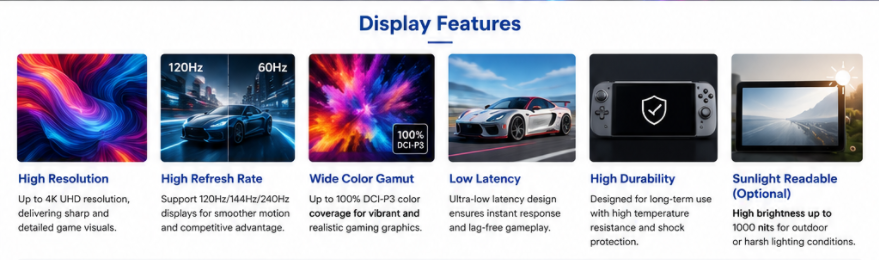
1. Choose the Right Display Technology
Different display technologies offer different advantages for gaming applications.
IPS LCD Display
IPS (In-Plane Switching) remains one of the most popular options for gaming consoles because of its:
· Wide viewing angles
· Stable color performance
· Faster response compared to standard TFT
· Better brightness consistency
Eurotech offers multiple IPS gaming display solutions for handheld and console applications.
OLED Display
OLED technology delivers:
· True blacks
· Ultra-high contrast
· Faster pixel response
· More immersive visuals
For premium gaming devices, OLED is ideal for HDR content and advanced graphics performance. Eurotech provides 15.6-inch and 49-inch gaming OLED display solutions for next-generation gaming devices.
AMOLED Display
AMOLED combines OLED quality with improved power efficiency and touch integration, making it highly suitable for portable gaming systems.
2. Resolution Matters for Image Quality
The higher the resolution, the sharper the image.
Common gaming display resolutions include:
· 720p (HD): Entry-level portable gaming
· 1080p (Full HD): Standard for handheld and console gaming
· 1440p (QHD): Better detail and smoother graphics
· 4K (Ultra HD): Best for premium gaming consoles
· 8K: Future-oriented high-end gaming
Eurotech offers gaming displays ranging from Full HD to 4K and even ultra-wide formats.
For handheld consoles, Full HD usually offers the best balance between image quality and power consumption.
3. Refresh Rate Is Critical for Smooth Gameplay
Refresh rate directly affects motion smoothness.
Recommended refresh rates:
· 60Hz for casual gaming
· 120Hz for competitive gaming
· 144Hz+ for high-performance gaming
· 240Hz+ for professional esports
Higher refresh rates reduce motion blur and improve reaction time, especially in:
· FPS games
· Racing games
· Sports games
· Action games
Eurotech gaming display solutions support high refresh and fast response technology optimized for immersive gameplay.
4. Response Time and Input Lag
Low response time and low input lag are essential.
A good gaming display should offer:
· 1ms–5ms response time
· Minimal ghosting
· Fast touch response
· Reduced latency between controller input and display output
This creates a more responsive gaming experience.
5. Color Performance for Better Visual Experience
Color quality significantly affects immersion.
Key specifications to consider:
· sRGB 100%
· NTSC 100%
· DCI-P3 wide color gamut
· HDR10 / HDR10+ support
· High contrast ratio
Eurotech gaming displays offer wide color gamut support and HDR-compatible solutions for enhanced realism.
6. Brightness for Indoor and Outdoor Gaming
Brightness determines visibility in different lighting conditions.
Recommended brightness:
· 300–500 nits: Indoor gaming
· 600–1000 nits: Bright environments
· 1000+ nits: Outdoor or portable gaming
Eurotech supports high-brightness custom gaming displays from 0 to 3000 nits, suitable for multiple gaming environments.
7. Touchscreen Integration for Handheld Consoles
Modern portable gaming consoles increasingly use touch functionality.
Important touch options:
· Capacitive touch
· Multi-touch support
· Glove touch
· Stylus compatibility
· Optical bonding for improved durability
Eurotech provides standard and customized touch screen integration for gaming applications.
8. Interface Compatibility
The display interface affects system integration.
Common gaming interfaces include:
· HDMI
· eDP
· LVDS
· MIPI
· USB-C
For handheld gaming devices, MIPI and eDP are often the best options due to lower power consumption and higher bandwidth.
9. Thermal Management and Durability
Gaming generates heat, especially with high brightness and high refresh rates.
Important factors:
· Heat dissipation structure
· Wide operating temperature
· Shock resistance
· Long LED lifespan
· Strong connector design
Eurotech’s display modules support industrial-grade thermal design and long-life LED backlights up to 100K hours.
10. Customization for OEM Gaming Devices
For gaming brands and console developers, customization is essential.
Eurotech offers:
· Custom LCD sizes
· Cover lens design
· Touch integration
· Driver board development
· HDMI adapter boards
· Embedded Android/Linux display solutions
· Optical bonding
· Industrial customization
These services help reduce development time and accelerate product launch.
Final Thoughts
Choosing the best display for gaming consoles depends on balancing performance, visual quality, durability, and power efficiency.
For handheld consoles, IPS and AMOLED are often the best choices due to their balance of cost and performance. For premium gaming systems, OLED and high-refresh IPS displays offer the best immersive experience.
Key factors to prioritize:
· Display technology
· Resolution
· Refresh rate
· Response time
· Color accuracy
· Brightness
· Touch integration
· Thermal stability
· OEM customization
With over years of display integration experience, Eurotech provides complete gaming display solutions, from compact handheld screens to ultra-high-resolution gaming panels, helping OEM brands build next-generation gaming devices.